
FE345 USDT Deposits: TRC20, ERC20 and the rate on screen
The Crypto tab takes USDT on two networks with very different minimums. Sending on the wrong one is the most expensive mistake available on this screen, and the app does not warn you about it.
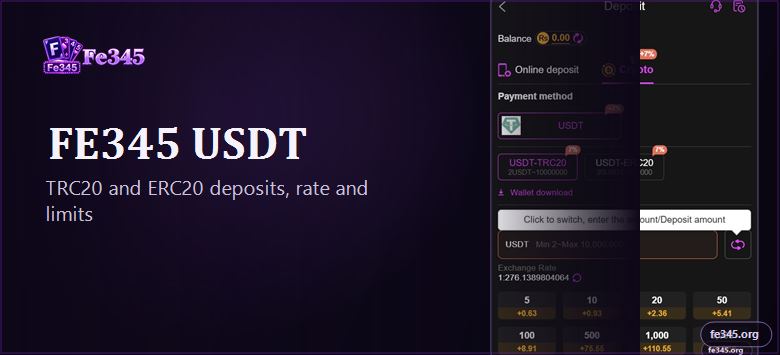
FE345 takes USDT, and nobody else mentions it
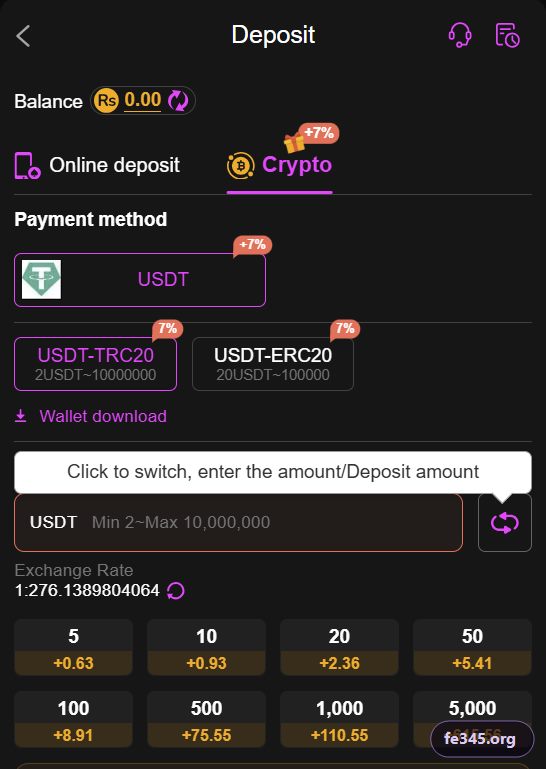
The FE345 deposit screen has two tabs. Every other page written about this app covers the first one — JazzCash and Easypaisa — and stops. The second tab takes USDT, the dollar-pegged stablecoin, on two different blockchains, with limits that bear no relationship to the rupee ones.
This page covers that tab. It is the most technical screen in the app and the one with the most expensive way to get it wrong.
- Asset
- USDT only
- Networks
- USDT-TRC20 and USDT-ERC20
- TRC20 range
- 2 USDT to 10,000,000 USDT
- ERC20 range
- 20 USDT to 100,000 USDT
- Field minimum
- “Min 2~Max 10,000,000”
- Rate displayed
- 1:276.1389804064
- Advertised bonus
- 7% badge on the tab and on each network
- Actual tile bonuses
- 8.9% to 15.1% — see below
- Network fee
- Not stated by FE345; charged by the blockchain
TRC20 against ERC20, and why the choice matters
USDT is not one thing. It is a token issued on several separate blockchains, and a balance on one chain cannot be sent to an address on another. The two FE345 accepts:
| USDT-TRC20 | USDT-ERC20 | |
|---|---|---|
| Underlying chain | Tron | Ethereum |
| Minimum shown | 2 USDT | 20 USDT |
| Maximum shown | 10,000,000 USDT | 100,000 USDT |
| Minimum in rupees | about Rs 552 | about Rs 5,523 |
| Bonus badge | 7% | 7% |
Rupee equivalents are ours, calculated from the 1:276.1389804064 rate the app displayed at the time of capture. The rate moves; treat them as illustrative.
The expensive mistake. Sending USDT across the wrong network — ERC20 tokens to a TRC20 address, or the reverse — generally destroys the funds. There is no undo, the chains cannot see each other, and recovery depends entirely on whether the receiving party has access to the destination key. FE345 publishes no warning about this on the screen and no recovery policy anywhere.
Select the network in the app first, copy the deposit address it generates for that network, and set the same network in your wallet or exchange before sending. Then check the first and last four characters of the address against the app.
In practice TRC20 is the sensible default for this kind of deposit: the minimum is ten times lower and Tron network fees are typically a fraction of Ethereum's. On a small deposit, an Ethereum network fee can be a double-digit percentage of what you are sending. That fee goes to the network, not to FE345, and it comes out before the deposit arrives.
The exchange rate, and the ceiling that makes no sense
The screen displayed a rate of 1:276.1389804064 with a refresh control beside it — one USDT to roughly Rs 276.14, quoted to ten decimal places. Ten decimal places on a number that moves every minute is theatre rather than precision, but the headline figure is in the normal range for a USDT/PKR rate.
Worth knowing:
- The rate is the operator's, not a market rate. Compare it against what you could get elsewhere before converting. The spread is where this kind of screen earns.
- It refreshes. The rate you are shown at the start of a deposit is not guaranteed to be the one applied at settlement, and FE345 does not state which applies.
- Your own conversion costs come first. Getting rupees into USDT costs something before any of this begins.
The two ceilings do not match
The rupee tab caps a deposit at Rs 50,000. The crypto tab caps TRC20 at 10,000,000 USDT, which at the displayed rate is roughly Rs 2.76 billion.
That is not a limit anyone will reach; it is a field left at its default. We mention it because it tells you something useful about how to read this app: the numbers on these screens are not all load-bearing, and a figure presented with great precision is not necessarily a figure anybody has checked. The same scepticism belongs on the bonus tiles below.
The crypto bonus tiles, measured
As on the rupee tab, the quick-amount tiles show a bonus, and as on the rupee tab, none of them is the advertised 7%:
| Deposit | Bonus shown | Effective rate |
|---|---|---|
| 5 USDT | +0.63 | 12.6% |
| 10 USDT | +0.93 | 9.3% |
| 20 USDT | +2.36 | 11.8% |
| 50 USDT | +5.41 | 10.8% |
| 100 USDT | +8.91 | 8.9% |
| 500 USDT | +75.55 | 15.1% |
| 1,000 USDT | +110.55 | 11.1% |
| 5,000 USDT | +615.56 | 12.3% |
Every tile pays more than the 7% badge, between 8.9% and 15.1%, and the pattern jumps around with no visible logic: 500 USDT is the best rate on the screen at 15.1%, while 100 USDT immediately below it is the worst at 8.9%.
We do not know the rule. We know the badge does not describe it, and that the same mismatch appears on the rupee tab, where rates run from 4.5% to 18.3%. Whatever generates these numbers, “7%” is not it.
One caution on reading this table as an opportunity: a higher deposit bonus on a gambling balance is not a return. It increases the amount you can stake, and the games retain a margin on everything staked. If a bonus carries a wagering requirement — FE345 does not say on this screen whether it does — it also cannot be withdrawn until that requirement is met.
Depositing USDT, step by step
- Open Deposit, then the Crypto tab. It is the second tab, badged +7%.
- Select USDT, then the network — TRC20 or ERC20. Decide this before anything else, because everything after depends on it.
- Enter the amount. At least 2 USDT on TRC20, at least 20 on ERC20.
- Copy the deposit address the app generates. Copy it, never retype it. Then verify the first four and last four characters against the screen.
- In your wallet or exchange, select the same network. This is the step that costs people their deposit. The network name must match exactly.
- Send, and keep the transaction hash. It is your only evidence that the transfer happened and the only thing support can trace.
- Wait for confirmations, then check the balance. If it has not moved after the network shows the transfer confirmed, contact support with the hash.
The app also offers a “Wallet download” link on this screen. We have not followed it and cannot tell you what it installs, so we are not recommending it either way. If you need a wallet, obtaining one from a source you chose yourself — rather than a link inside a gambling app — is the safer habit.
Is the crypto route worth using?
A fair summary of the trade-offs, given most readers here will be depositing rupees:
- It is more steps and more ways to fail. Buying USDT, holding it, choosing a network and sending to an address, against tapping a wallet you already use daily.
- The bonus tiles do pay more — 8.9% to 15.1% against 4.5% to 18.3% on the rupee side, and more consistently.
- You take exchange-rate and fee risk at conversion, at the network, and at the operator's quoted rate.
- A mistaken network is unrecoverable, which is not true of a mistyped JazzCash transfer.
- It is harder to keep records, and records are what you need if something goes wrong.
For most people depositing small amounts, JazzCash or Easypaisa is the better route — the limits are designed for rupee amounts and the process is one you already understand. The crypto tab is worth knowing about because it exists and because it tells you something about the operator, not because it is a better deal.
FE345 USDT FAQs
Does FE345 accept crypto?
Yes. The deposit screen has a Crypto tab alongside the rupee one, accepting USDT on two networks: USDT-TRC20 and USDT-ERC20. No other coin is offered on that screen. The tab carries the same +7% badge as the rupee side.
What is the minimum USDT deposit on FE345?
2 USDT on the TRC20 network, or 20 USDT on ERC20. The amount field states “Min 2~Max 10,000,000”. At the 1:276.1389804064 rate the app displayed, 2 USDT is roughly Rs 552 and 20 USDT roughly Rs 5,523.
Should I use TRC20 or ERC20 on FE345?
TRC20 for most deposits. Its minimum is 2 USDT against 20 on ERC20, and Tron network fees are typically a small fraction of Ethereum's, which matters because that fee is deducted before the deposit arrives. Whichever you pick, the network selected in the app and the network selected in your wallet must match exactly.
What happens if I send USDT on the wrong network?
The funds are generally lost. The two chains cannot see each other, there is no reversal mechanism, and recovery depends entirely on whether the receiving party controls the key on the destination chain. FE345 publishes no warning about this on the deposit screen and no recovery policy. Select the network first, copy the address rather than typing it, and check its first and last four characters.
What exchange rate does FE345 use for USDT?
The screen displayed 1:276.1389804064 — about Rs 276.14 per USDT — with a refresh control beside it. That is the operator's rate, not a market rate, and FE345 does not state whether the rate shown when you start a deposit is the one applied at settlement. Compare it against the rate available elsewhere before converting.
Why does FE345 allow 10,000,000 USDT but only Rs 50,000?
We do not know, and the app does not explain it. The rupee tab caps a single deposit at Rs 50,000 while the TRC20 ceiling is 10,000,000 USDT, roughly Rs 2.76 billion at the displayed rate. It reads like a default value nobody adjusted rather than a real limit, which is a useful reminder that not every precise-looking number on these screens has been checked by anyone.