
FE345 Login and Registration, step by step
Registration takes a mobile number and a password you choose. This page covers what each screen asks for, what happens when login fails, and the account habits worth setting up on day one.
Before you register
Registration on FE345 is quick, which is precisely why it is worth spending two minutes on these four decisions first. Each one is far easier to get right now than to fix later.
- Pick a password you use nowhere else. This account holds money. The operator publishes no security policy, no breach history and no company name, so assume the worst and make sure a problem here cannot become a problem anywhere else.
- Do not build it from your wallet PIN. Not the JazzCash PIN, not the Easypaisa PIN, and nothing that resembles either.
- Use the number you actually control. Registration is tied to a mobile number and the verification code arrives there. A number you are about to change, or one on a SIM you share, will become a lockout.
- Decide your deposit limit now, before you have an account and before anything is at stake. This is the single most useful thing on this page. Our responsible gaming page takes two minutes.
No legitimate operator or support agent ever needs your password. Not to credit a deposit, not to fix a login, not to release a bonus. Anyone who asks for it — in WhatsApp, in a group, or inside any chat window — is attempting to take the account.
How FE345 registration works
The flow follows the standard pattern for apps of this kind:
- Install the APK and open it. If you have not got that far, the download guide covers the sideload and the Play Protect dialogue.
- Choose Register rather than Login on the first screen.
- Enter your mobile number in the format the field expects.
- Set a password, following the rules above rather than the minimum the field will accept.
- Enter the verification code sent by SMS, if the app requests one.
- Enter an invitation code if you have one. This field is normally optional, it links your account to whoever referred you, and it usually cannot be changed afterwards.
- Submit, then log in with the number and password you just set.
We have described the sequence rather than the exact field labels, because we captured the app logged in rather than at registration. Where we have not seen a screen we say so instead of inventing its contents — that principle is set out on the about page.
What we could not verify about registration
- The password rules. Minimum length, whether symbols are allowed or required: not published.
- Whether SMS verification is always required, or only in some cases.
- Whether an email address can be attached for recovery.
- Whether the invitation code can be changed after signup. In most apps of this design it cannot.
- Any identity verification requirement before withdrawal. Nothing in the app states one — which is not the same as there not being one. See the withdrawal guide.
What you land on after logging in
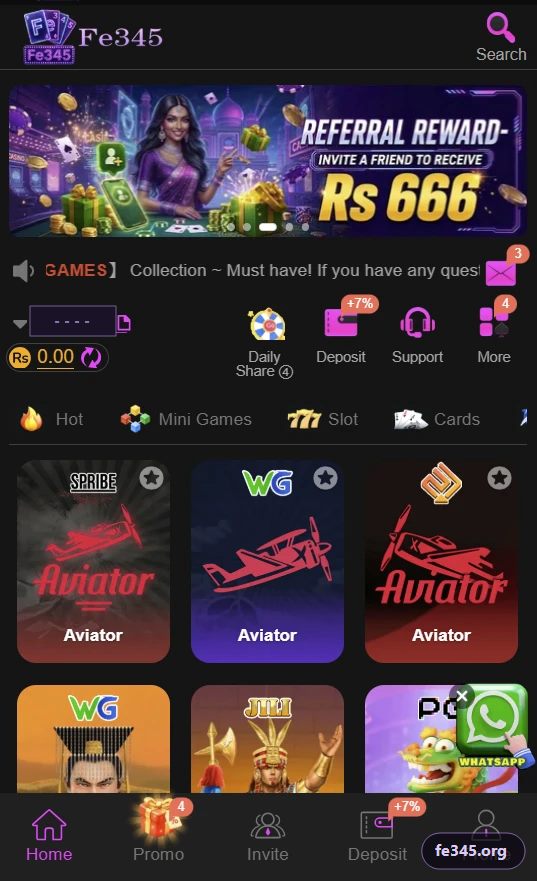
Four things on this screen are worth finding on day one:
- Your account name and the copy button beside it. Support will ask for this. Copying it beats reading it out.
- The balance and its refresh control. Settlement is not always instant; refresh before assuming a deposit has failed.
- Support. One of the four quick controls, alongside a floating WhatsApp button. Find it before you need it.
- Profile, in the bottom bar. Security settings, if there are any, live here.
The home screen also carries a +7% badge on the Deposit control. That badge does not match any bonus tile on the deposit screen itself — the real rates run from 4.5% to 18.3% depending on the amount. The arithmetic is here.
When login does not work
In the order worth trying:
- Check the number format. Leading zero or country code, as the field asks. This is the most common cause and the least interesting.
- Check for a stale app version. The app is sideloaded, so it does not auto-update. Reinstalling from the operator's current link is the equivalent of updating.
- Try a different connection. Mobile data instead of Wi-Fi, or the reverse. Some networks in Pakistan have blocked domains associated with these platforms, and the symptom looks like a login failure rather than a block.
- Wait before retrying repeatedly. Repeated failures often trigger a temporary lock, which turns a small problem into a long one.
- Use the in-app password reset, which will send a code to your registered number.
- Contact Support with your account name, your registered number and what you have already tried. Never include your password.
We have not tested FE345's support response times and publish no figure for them. The app shows a Support control and a WhatsApp button; what either means in practice we cannot tell you.
If you have lost access to the registered number
This is the hard case. The number is the recovery route, so losing it means asking support to move an account to a new number — a process the app documents nowhere. If you are about to change SIM, deal with it while you still have both. If there is a balance involved, withdraw it first.
Account habits worth keeping
- Treat the balance as at risk, not as savings. Withdraw rather than accumulate. There is no deposit protection scheme behind this account.
- Keep your own record of every deposit, outside the app. A wallet screenshot is evidence; an in-app balance is not.
- Generate a fresh deposit code every time. The operator's own Platform Notice states that losses from reusing a saved code are borne entirely by you.
- Never share a screenshot showing your account name or invitation code. We paint both out of every screenshot on this site for the same reason.
- Lock your phone properly. An app holding money, behind no screen lock, is one lost phone away from being somebody else's.
- Be sceptical of anyone offering help. Groups around these apps are full of people offering to deposit for you, fix your account or unlock a bonus. Each of those is a known way to lose money.
FE345 login FAQs
How do I register on FE345?
Install the APK from the operator's link, open the app, choose Register, and enter a mobile number and a password you set. The app may send an SMS verification code, and there is normally an optional invitation code field which links your account to whoever referred you and usually cannot be changed later. Then log in with the number and password you just created.
Why can I not log in to FE345?
The usual causes, in order: the number format does not match what the field expects; the installed APK is out of date, which does not fix itself because the app is sideloaded; or the network is blocking the operator's domain, which looks like a login failure rather than a block. Try the other connection, reinstall from the current link, and avoid repeated rapid retries, which can trigger a temporary lock.
Can I reset my FE345 password?
The app offers a password reset that sends a code to your registered mobile number, which is why the number you register with must be one you actually control. We have not tested the reset flow ourselves. If you no longer have access to the registered number, recovery means asking support to move the account, and the app documents no process for that.
Does FE345 need an invitation code to register?
The invitation code field is normally optional in apps of this design, and entering one links your account to the person who referred you. In most such apps it cannot be changed after registration. The code is generated on the Invite screen, where each account also gets its own referral link and QR code.
Is my FE345 account safe?
FE345 publishes no security policy, no company name, no registered address and no licence, so there is no basis on which to call the account safe and we will not pretend otherwise. What you can control: a password used nowhere else and unrelated to any wallet PIN, a phone with a screen lock, withdrawing rather than accumulating a balance, and never sharing a password with anyone claiming to be support.
Does FE345 require identity verification?
Nothing in the app states a KYC or identity requirement, and we did not reach a withdrawal screen. That is not the same as there being none — platforms of this kind often request documents at the point of withdrawal rather than at signup. We flag it as unverified rather than answering it either way.