
FE345 Deposit: JazzCash, Easypaisa and the limits on screen
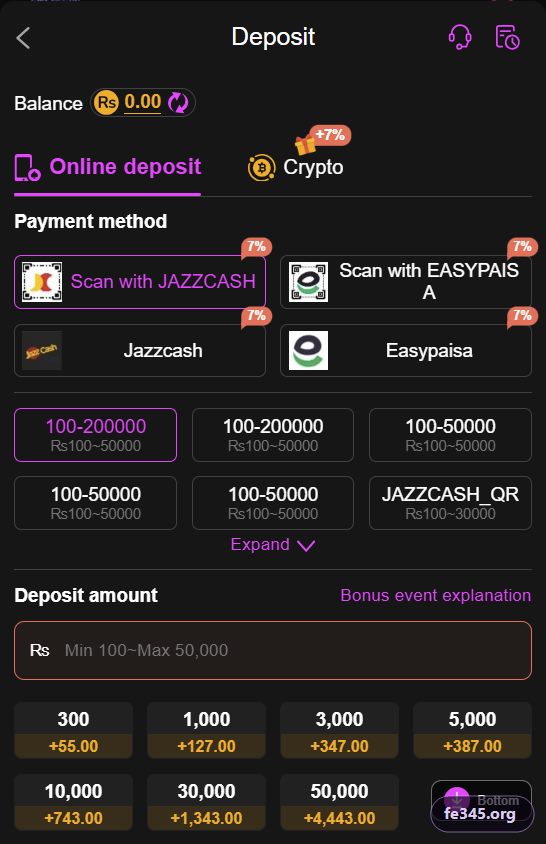
The deposit screen publishes a Rs 100 minimum and a Rs 50,000 maximum, six channels and a row of quick-amount tiles with a bonus on each. The bonus rates on those tiles are not the 7% the badge advertises, and this page shows the arithmetic.
The limits, exactly as the screen states them
- Minimum
- Rs 100
- Maximum
- Rs 50,000 per deposit
- Lowest channel ceiling
- Rs 30,000 (JAZZCASH_QR)
- Methods
- Scan with JAZZCASH, Scan with EASYPAISA, Jazzcash, Easypaisa
- Channels visible
- Six, with more behind an Expand control
- Advertised bonus
- +7% badge on every method
- Actual tile bonuses
- 4.5% to 18.3% — see below
- Crypto alternative
- USDT, different limits entirely
- Processing time
- Not published by the operator
- Deposit fee
- Not published by the operator
Two of those rows are blank on purpose. FE345 states no processing time and no fee anywhere on this screen, and we are not going to invent either. Several pages about this app print “deposits credited in 2–3 minutes” with nothing behind it; that sentence is a template, not an observation.
The channel tiles, and the labels that disagree with them
Below the payment methods sits a grid of channel tiles. Each has a bold label and a smaller range beneath it. On the screen we captured:
| Tile label | Range shown beneath |
|---|---|
| 100-200000 | Rs100~50000 (selected) |
| 100-200000 | Rs100~50000 |
| 100-50000 | Rs100~50000 |
| 100-50000 | Rs100~50000 |
| 100-50000 | Rs100~50000 |
| JAZZCASH_QR | Rs100~30000 |
Note the first two. The label says 100-200000; the range directly beneath it says Rs100~50000, and the amount field at the bottom of the screen also caps at Rs 50,000. The label and the limit disagree by a factor of four.
We cannot tell you which one binds, because we did not deposit. What we can tell you is what to do about it: trust the amount field, not the tile name. If a transfer above Rs 50,000 is rejected or lands uncredited, you are in the territory the operator's own notice disclaims. Keep deposits inside the range the input box states.
The +7% badge, and the arithmetic behind it
Every route into this screen carries a +7% badge — the Deposit control on the home screen, the bottom navigation bar, and each payment method tile. The quick-amount tiles then show the bonus you would actually receive, and the two do not match:
| Deposit | Bonus shown | Effective rate | Total credited |
|---|---|---|---|
| Rs 300 | +55.00 | 18.3% | Rs 355 |
| Rs 1,000 | +127.00 | 12.7% | Rs 1,127 |
| Rs 3,000 | +347.00 | 11.6% | Rs 3,347 |
| Rs 5,000 | +387.00 | 7.7% | Rs 5,387 |
| Rs 10,000 | +743.00 | 7.4% | Rs 10,743 |
| Rs 30,000 | +1,343.00 | 4.5% | Rs 31,343 |
| Rs 50,000 | +4,443.00 | 8.9% | Rs 54,443 |
What the table shows:
- Nothing pays 7%. The closest is Rs 10,000 at 7.4%.
- Small deposits get the best rate. Rs 300 returns 18.3% — four times the rate on Rs 30,000.
- The curve is not smooth. It falls from 18.3% to 4.5%, then jumps back to 8.9% at the top tile. Rs 5,000 pays only Rs 40 more than Rs 3,000.
There is a “Bonus event explanation” link beside the amount field, which is presumably where the rule lives. We did not capture that screen, so we do not publish its contents. Read it inside the app before you deposit, and read it specifically for wagering requirements: a deposit bonus in this kind of product is usually locked behind a turnover condition, which means the bonus is not withdrawable until you have staked some multiple of it. FE345 does not state that condition on this screen either way.
Do not let the bonus pick the amount. The rate pattern makes a larger deposit look efficient and it is not. Decide what you are willing to lose, deposit that, and treat whatever bonus arrives as incidental. Setting the number before you open the app is the habit that matters.
How to deposit, step by step
- Make sure the wallet you are paying from is yours and is funded. FE345 settles in rupees through JazzCash and Easypaisa; both are Pakistani mobile wallets with their own apps and their own limits.
- Open Deposit inside FE345 — from the home screen control or the bottom bar.
- Choose a method, then a channel tile. Check the range beneath the tile rather than its label.
- Enter the amount or tap a quick-amount tile. The field states Min 100~Max 50,000.
- Generate a fresh code for this payment. Not one from last time. The operator's own notice is explicit about this, and the next section explains why it matters more than it sounds.
- Pay from your wallet app, then return to FE345 and let the order settle. Keep the wallet's confirmation SMS or screenshot.
- Check the balance refreshed. If it has not, use Support from the home screen, with your transaction ID ready.
The two payment providers
Both wallets are independent of FE345 and have their own support channels, limits and fraud reporting. If a transfer leaves your wallet and does not arrive, the wallet's transaction record is your evidence — which is why the screenshot step above is not optional:
- Easypaisa — the official Easypaisa site, for wallet limits, account issues and fraud reporting.
- JazzCash — the official JazzCash site, for the same.
Those two links go to the payment providers themselves. They are not referral links and we are not paid for them. Neither company endorses FE345 or this site.
Why you must generate a new code every time
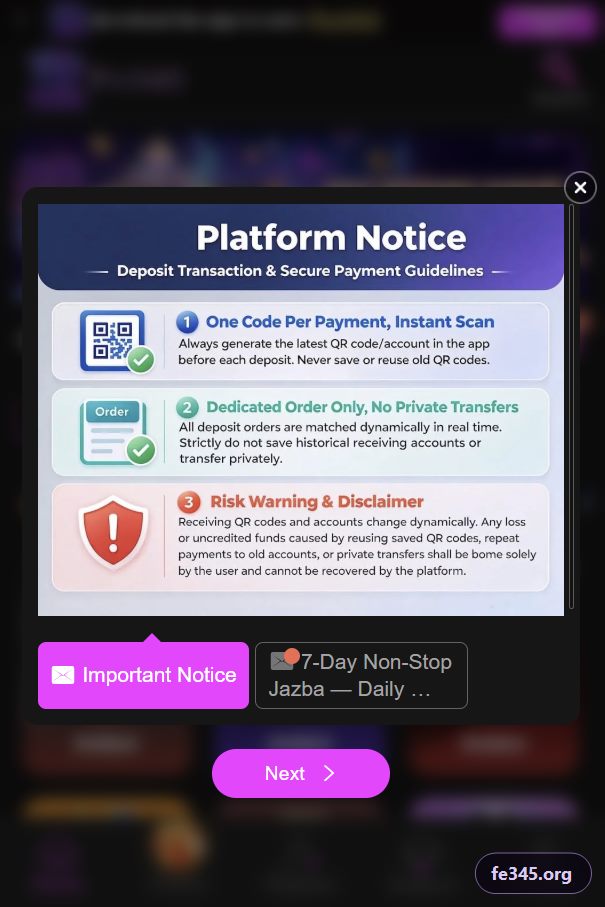
FE345 shows a Platform Notice headed “Deposit Transaction & Secure Payment Guidelines”. Quoting it directly:
- “Always generate the latest QR code/account in the app before each deposit. Never save or reuse old QR codes.”
- “All deposit orders are matched dynamically in real time. Strictly do not save historical receiving accounts or transfer privately.”
- “Receiving QR codes and accounts change dynamically. Any loss or uncredited funds caused by reusing saved QR codes, repeat payments to old accounts, or private transfers shall be borne solely by the user and cannot be recovered by the platform.”
In plain terms: the account you pay into rotates, and if you pay the wrong one the money is gone and it is your problem. That is unusually direct for an operator, and it deserves to be taken at face value.
It also describes, precisely, how deposit-interception fraud works in this market. Someone in a group chat sends you a JazzCash number and tells you to deposit through it for a bonus. The number is theirs. Your money arrives, your balance does not move, and the operator's terms say they cannot help. Three rules follow:
- Only ever pay an account generated inside the app, for this deposit.
- Never pay a number sent to you by a person, whatever they claim their role is. There is no such thing as an agent who takes your deposit for you.
- Never save a receiving account to your contacts or your wallet's favourites. Saving it is the whole mechanism of the loss the notice describes.
When a deposit does not arrive
Work through it in this order:
- Refresh the balance with the control beside it on the home screen. Settlement is not always instant.
- Check your wallet app and confirm the money actually left, and to which account. Screenshot it.
- Compare that account with the one the app generated for this order. If they differ, that is what happened, and the Platform Notice above sets out where you stand.
- Contact Support from the home screen, with the transaction ID, the amount, the time and the receiving account. The app shows a Support control and a WhatsApp button.
- If the money left your wallet and the recipient was not the app's account, report it to Easypaisa or JazzCash as well. They own the rails and have their own fraud process.
We have not tested FE345's support response times and do not publish a figure for them. The app shows a Support entry and a WhatsApp button; what that means in practice we cannot tell you.
FE345 deposit FAQs
What is the minimum deposit on FE345?
Rs 100. The maximum is Rs 50,000 per deposit, stated in the amount field as “Min 100~Max 50,000”. One channel, JAZZCASH_QR, carries a lower ceiling of Rs 30,000. If you deposit in USDT instead, the minimum is 2 USDT on TRC20 or 20 USDT on ERC20.
Does FE345 accept JazzCash and Easypaisa?
Yes. The Online deposit screen offers four methods: Scan with JAZZCASH, Scan with EASYPAISA, Jazzcash and Easypaisa. The two scan options use a QR code generated inside the app. The operator's Platform Notice states that this code must be regenerated for every deposit and never reused.
Is the FE345 deposit bonus really 7%?
Not on any tile we saw. The +7% badge appears on every entry point to the deposit screen, but the quick-amount tiles show bonuses working out between 4.5% and 18.3%. Rs 300 pays 18.3%, Rs 30,000 pays 4.5%, and Rs 10,000 at 7.4% is the closest to the badge. The app offers a “Bonus event explanation” link which presumably sets out the rule; we did not capture that screen and so publish nothing from it.
Is there a fee to deposit on FE345?
The app does not state one on the deposit screen, and we did not deposit, so we cannot confirm whether one is applied at settlement. Your wallet provider may also charge for the transfer itself — that is a JazzCash or Easypaisa question, and their own sites carry current charges.
How long does an FE345 deposit take to credit?
FE345 does not publish a processing time anywhere on the deposit screen, and we have not measured one. Pages stating “2 to 3 minutes” give no source for it. The screen does say deposit orders are “matched dynamically in real time”, which describes the matching rather than the credit time.
Why do the channel tiles say 100-200000 when the limit is Rs 50,000?
We do not know, and the app does not explain it. Two of the six channel tiles are labelled 100-200000 while the range printed directly beneath each of them reads Rs100~50000, matching the cap in the amount field. Treat the amount field as the real limit and keep deposits inside it.
Can someone else deposit into my FE345 account for me?
The operator's Platform Notice says to use only the account the app generates for your own order and warns specifically against private transfers, stating that any resulting loss is borne solely by the user. In practice, anyone offering to take your money and credit your balance is describing the exact scenario that notice disclaims.